Introduction to Apache Solr
Overview
Apache Solr is an open-source full-text search platform built on Apache Lucene. Lucene is a Java library for analyzing, indexing, and searching information; it was first developed by Doug Cutting in 2000. Cutting is also the creator of Hadoop from his time at Yahoo in 2005.
Apache Solr began as a CNET internal project by Yonik Seeley to power search for the CNET website in 2004, and was contributed to the Apache Software Foundation in 2006. Solr is not simply a RESTful interface to Lucene—it uses Lucene as one component within a larger system. After Solr 1.4, starting with version 3.1 (March 2011), Solr and Lucene share a single codebase and version number.
High-level architecture
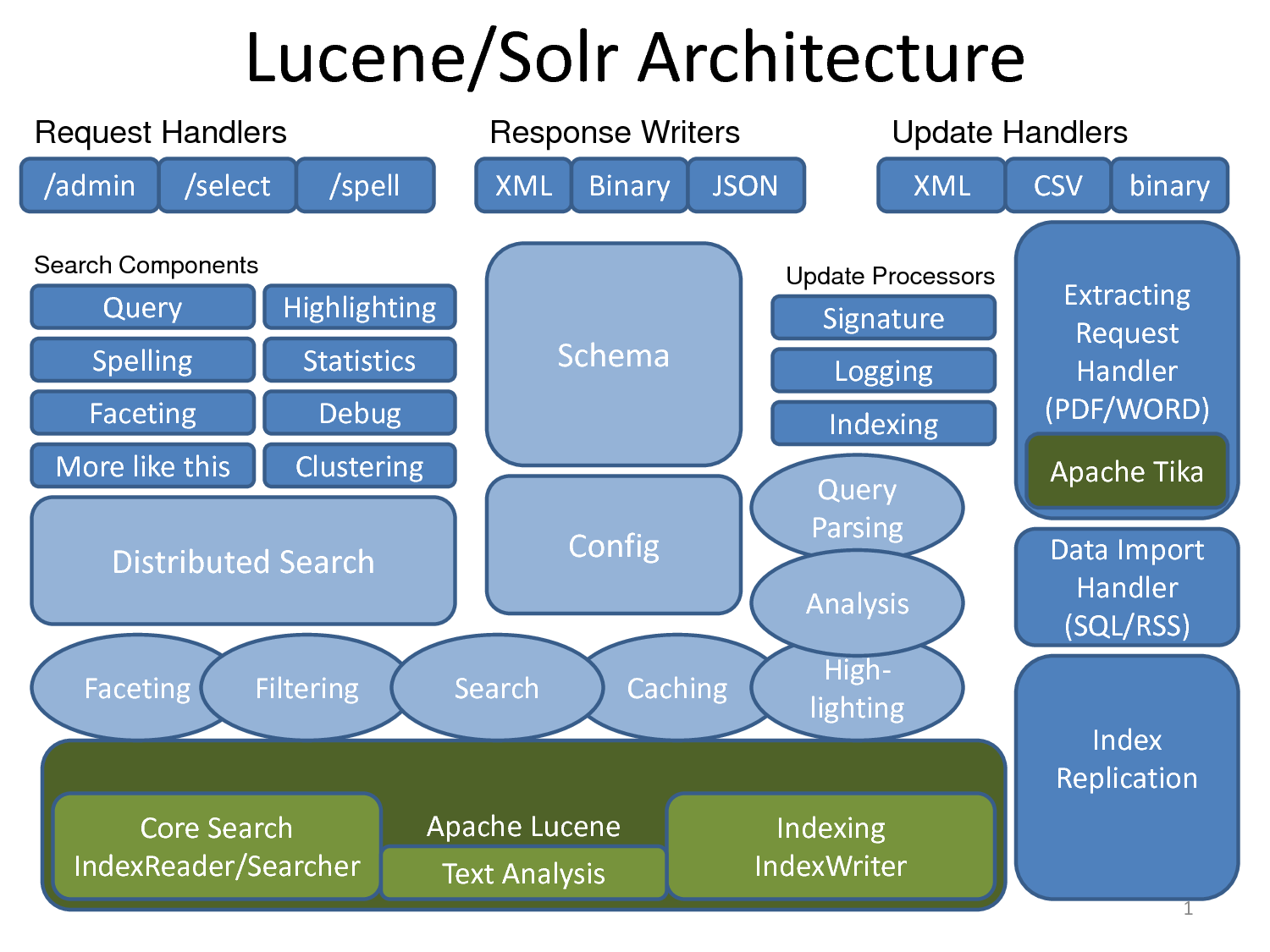
Overall, Solr is made up of several components, including:
- Apache Lucene for analyzing, indexing, and searching data.
- Apache Tika for extracting metadata and indexing many document types such as PDF, DOCX, MP3, and JPG (more than 66 file types).
- Apache UIMA (pronounced “you-eee-mah,” Unstructured Information Management Architecture)—another Apache Foundation project used to analyze large volumes of unstructured data and surface useful information. Examples:
- Analyzing films, extracting subtitles, and discovering which actors appear in a film.
- Finding articles, videos, and images related to the topic of a given article.
- Apache Velocity, a Java-based template engine.
- Carrot2 (search-results clustering) for grouping hits into thematic categories.
Notable features:
- Flexible configuration
- Extensible architecture
- Multilingual support
Because Solr makes it straightforward to configure filters and tokenizers, it can address many language-specific concerns. For technical detail, see Analyzers, Tokenizers and Token Filters and Language Analysis.
- Analyzer
An analyzer inspects text fields and produces a token stream. For example:
WhitespaceAnalyzersplits text into tokens on whitespace. The analyzer is specified as an attribute on the tag inschema.xml. For example, “The quick brown fox jump over the lazy dog” becomes tokens:[The] [quick] [brown] [fox] [jump] [over] [the] [lazy] [dog]
  <fieldtype class="solr.TextField" name="nametext">
   <analyzer class="org.apache.lucene.analysis.WhitespaceAnalyzer">
  </analyzer>
</fieldtype>- Tokenizer
If the analyzer produces token streams, the tokenizer splits those streams into tokens—the smallest units you index (words or characters). Characters in the input stream may be skipped, such as invisible whitespace (spaces, tabs) or delimiters (commas, periods).
For CJK (Chinese–Japanese–Korean) text you typically use an N-Gram tokenizer. It splits the input stream into character n-grams of length N according to your settings. For example, with the word “bicycle” and N between 4 and 5:
<analyzer>
  <tokenizer class="solr.NGramTokenizerFactory" minGramSize="4" maxGramSize="5"/>
</analyzer>
then “bicycle” is analyzed into tokens such as:
[bicy], [icyc], [cycl], [ycle], [bicyc], [icycl], [cycle]
That may look odd for English, but it matters for CJK scripts: those languages often do not separate words with spaces, and the meaning of a character depends on neighbors. For example, the character 的 combines differently in 目的 (“purpose”), 的确 (“indeed”), and 是的 (“yes”); because Chinese does not use spaces between words, indexing meaningful character combinations is important for search.
<fieldType name="text" class="solr.TextField">
 <analyzer>
 <tokenizer class="solr.StandardTokenizerFactory"/>
 </analyzer>
</fieldType>- Filter
Like a tokenizer, a filter reads an input stream and emits tokens, but it can transform tokens—for example lowercasing, expanding abbreviations (state or city names) to full forms, or the reverse.
<fieldType name="text" class="solr.TextField">
    <analyzer>
        <tokenizer class="solr.StandardTokenizerFactory"/>
        <filter class="solr.StandardFilterFactory"/>
        <filter class="solr.LowerCaseFilterFactory"/>
        <filter class="solr.EnglishPorterFilterFactory"/>
    </analyzer>
</fieldType>
Language-related topics
- Stopwords
Stopwords are words that carry little or no search value and are removed from the index. In English, examples include an, and, at, as if, for, but, by, and so on.
- Stemming
Stemming reduces inflected forms to a common root. In English, write, wrote, written, and writing all stem to write.
- Synonym
Every language has its own synonyms and abbreviations. Handling synonyms well is important if you want the best search results for users.
- Protected words
Solr can be configured to exclude certain “protected” terms from indexing—for example names you must not drop, or keywords you want to keep out of the index.
- Compound word splitting
Some languages, such as German and Finnish, concatenate words without spaces (e.g. in Finnish, “city hospital” is kaupunginsairaala: kaupungin “of the city” + sairaala “hospital,” written as one word).
- Spelling checking
Spelling correction is tightly language-dependent. In Solr 4.4.0 there are three SpellChecker implementations:
org.apache.solr.spelling.IndexBasedSpellChecker
Suggests corrections from word frequencies already in the Solr index.org.apache.solr.spelling.FileBasedSpellChecker
You supply a file of valid words, one per line.org.apache.solr.spelling.DirectSolrSpellChecker
Instead of building an n-gram index for the term under test and querying the main index, this implementation uses the Levenshtein distance directly against the existing index. See LUCENE-2507 and Levenshtein distance.
- Faceted navigation
See Faceted Search – the 120 Million Documents Story.
- Tunable scoring / custom document ranking
A common real-world use is sponsored or boosted results (similar in spirit to sponsored search), using BoostQParserPlugin.
-
Scalability
-
Easy integration
Solr’s REST-oriented design returns XML, CSV, JSON, and more, so it integrates cleanly with CMSs such as Drupal and with language clients (Solr PHP client, Ruby on Rails acts_as_solr, etc.).
- Sharding, caching, distributed search
Solr supports distributed search across servers through features grouped under SolrCloud.
- Near real-time search
New documents can be indexed and searchable with very low latency.
Layout and installation
Trying Solr is simple: download the archive, unpack it, go to the example directory, and run start.jar. For walkthroughs, see the Solr 4.4.0 tutorial and the official Solr documentation.
Typical layout after unpacking:
  .
  |-- CHANGES.txt
  |-- LICENSE.txt
  |-- NOTICE.txt
  |-- README.txt
  |-- SYSTEM_REQUIREMENTS.txt
  |-- contrib
  |-- dist
  |-- docs
  |-- example
  `-- licenses
$tar -xvf solr-4.4.0.tgz
$cd solr-4.4.0/example/
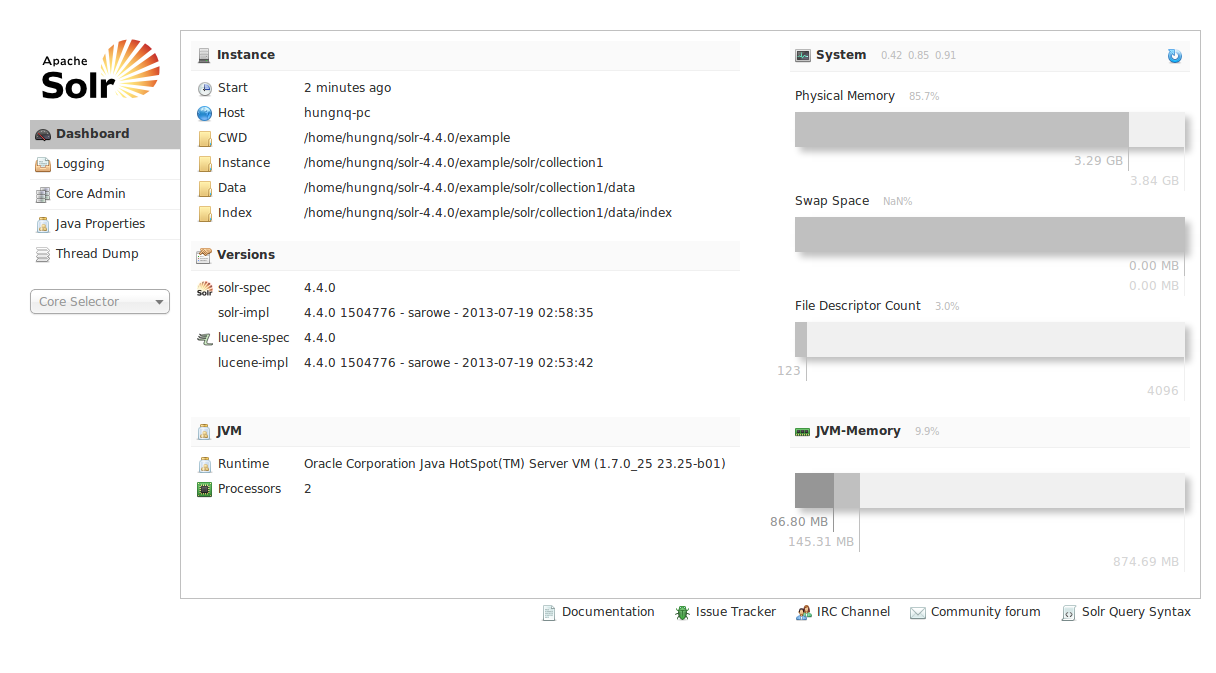
$java -jar start.jarThen open http://localhost:8983/solr/. If the Solr admin UI loads, Solr is running locally.
In Solr 4.4.0, schema.xml and other config files live under /solr-4.4.0/example/solr/collection1/conf:
~/solr-4.4.0/example/solr/collection1/conf]$tree -L 1
.
|-- admin-extra.html
|-- admin-extra.menu-bottom.html
|-- admin-extra.menu-top.html
|-- currency.xml
|-- elevate.xml
|-- lang
|-- mapping-FoldToASCII.txt
|-- mapping-ISOLatin1Accent.txt
|-- protwords.txt
|-- schema.xml
|-- scripts.conf
|-- solrconfig.xml
|-- spellings.txt
|-- stopwords.txt
|-- synonyms.txt
|-- update-script.js
|-- velocity
`-- xslt
Example: configuring an app with Solr
The following example configures Solr to index and search data from your database.
Suppose we have a bookstore schema like this:
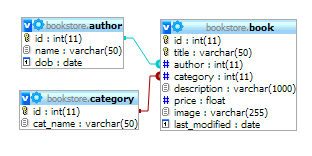
- schema.xml
In schema.xml we define a field type text_vi for Vietnamese search. In practice it is copied from text_en with ASCIIFoldingFilterFactory added to fold Unicode characters to their ASCII equivalents. Alternatively you can use solr.MappingCharFilterFactory (see the docs) and a mapping file similar to a Sphinx setup.
 <fieldType name="text_vi" class="solr.TextField" positionIncrementGap="100">
      <analyzer type="index">
        <tokenizer class="solr.WhitespaceTokenizerFactory"/>
        <filter class="solr.StopFilterFactory"
                ignoreCase="true"
                words="stopwords.txt"
                enablePositionIncrements="true"
                />

        <filter class="solr.WordDelimiterFilterFactory" generateWordParts="1" generateNumberParts="1" catenateWords="1" catenateNumbers="1" catenateAll="0" splitOnCaseChange="1"/>
        <filter class="solr.LowerCaseFilterFactory"/>
  <filter class="solr.ASCIIFoldingFilterFactory"/>
        <filter class="solr.SnowballPorterFilterFactory" language="English" protected="protwords.txt"/>
      </analyzer>
      <analyzer type="query">
        <tokenizer class="solr.WhitespaceTokenizerFactory"/>
        <filter class="solr.SynonymFilterFactory" synonyms="synonyms.txt" ignoreCase="true" expand="true"/>
        <filter class="solr.StopFilterFactory"
                ignoreCase="true"
                words="stopwords.txt"
                enablePositionIncrements="true"
                />
  <filter class="solr.ASCIIFoldingFilterFactory"/>
        <filter class="solr.WordDelimiterFilterFactory" generateWordParts="1" generateNumberParts="1" catenateWords="0" catenateNumbers="0" catenateAll="0" splitOnCaseChange="1"/>
        <filter class="solr.LowerCaseFilterFactory"/>
        <filter class="solr.SnowballPorterFilterFactory" language="English" protected="protwords.txt"/>
      </analyzer>
    </fieldType>
 <fields>
 <field name="id" type="string" indexed="true" stored="true" required="true"/>
 <field name="title" type="text_vi" indexed="true" stored="true"/>
 <field name="author_name" type="text_vi" indexed="true" stored="true" />
 <field name="category_name" type="text_vi" indexed="true" stored="true" />
 <field name="description" type="text_vi" indexed="true" stored="true" />
 <field name="_version_" type="long" indexed="true" stored="true" multiValued="false"/>
 <field name="text" type="text_general" indexed="true" stored="false" multiValued="true"/>
</fields>- solrconfig.xml
In solrconfig.xml we wire Solr to import data from MySQL for indexing: add libraries for the DataImportHandler and the MySQL JDBC driver.
  <lib dir="../../../contrib/dataimporthandler/lib" regex=".*\.jar" />
  <lib dir="../../../dist/" regex="solr-dataimporthandler-\d.*\.jar" />
  <lib dir="../../lib/" regex="mysql-connector-java-5.1.4-bin.jar"/>
  <requestHandler name="/dataimport" class="org.apache.solr.handler.dataimport.DataImportHandler">
   <lst name="defaults">
    <str name="config">db-data-config.xml</str>
   </lst>
</requestHandler>- db-data-config.xml
This file maps Solr fields to database tables and columns.
  <dataConfig>
   <dataSource type="JdbcDataSource" driver="com.mysql.jdbc.Driver" url="jdbc:mysql://localhost:3306/bookstore" user="root" password="" />
   <document>
    <entity name="book" query="SELECT id, title, author, category, description from book">
     <field column="id" name="id" />
     <field column="title" name="title" />
     <field column="description" name="description" />
     <entity name="category_name" query="SELECT cat_name FROM category c where c.id = '${book.category}'">
      <field name="category_name" column="cat_name" />
     </entity>
     <entity name="author_name" query="SELECT name FROM author a where a.id = '${book.author}'">
      <field name="author_name" column="name" />
     </entity>
     <field column="last_modified" name="last_modified"/>
    </entity>
   </document>
</dataConfig>- After configuration, start Solr with
$ java -jar start.jar.
Solr runs on the embedded Jetty server from the distribution; in production you can deploy the same Solr webapp on standalone Jetty or Tomcat without using start.jar.
If the server starts without errors (no ClassNotFoundException, no “undefined field,” etc.), the configuration is likely valid.
To import data from MySQL, open:
http://localhost:8983/solr/dataimport?command=full-import
If all goes well, you should see a response like:
To try search, issue queries such as:
-
http://localhost:8983/solr/select?q=title:Harry+Potter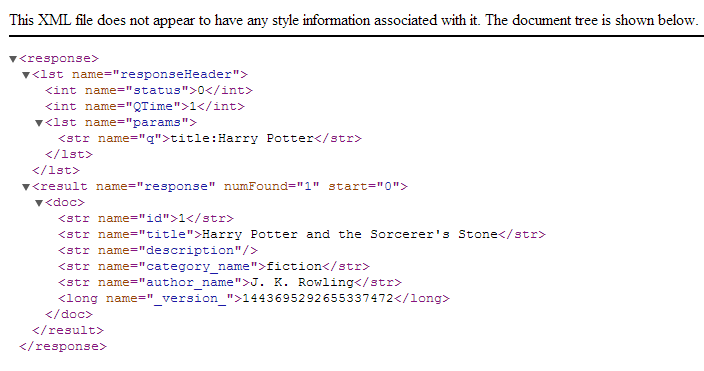
-
http://localhost:8983/solr/select?q=author_name:Nguyễn%20Nhật%20Ánh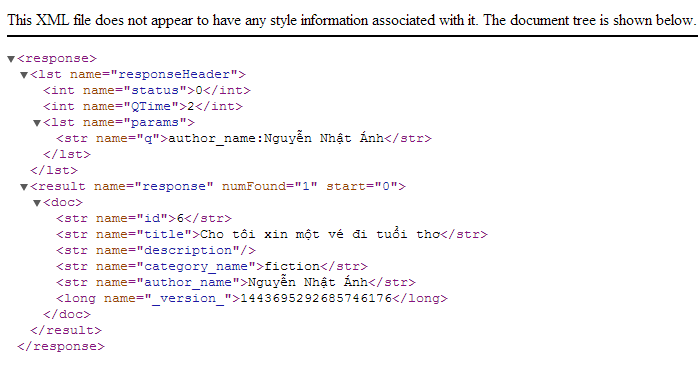
To get JSON responses, append &wt=json to the query, for example:
http://localhost:8983/solr/select?q=title:Harry+Potter&wt=json
That completes a basic Solr setup and smoke test. For PHP, you can use the solr-php-client library, or implement a thin client over Solr’s XML or JSON HTTP API. Sample configs under /solr-4.4.0/example/solr/collection1/conf and the bookstore database are available at https://github.com/hungnq1989/solr-example
References
- Apache Solr Reference Guide (n.d.). PDF (Solr 4.4). Accessed 18 Aug 2013.
- Jaran Nilsen (2011). Apache Solr Search for everyone (SlideShare). Accessed 18 Aug 2013.
- Peter Karussell (2011). Apache Solr: Get started, get excited. Accessed 18 Aug 2013.
- Tyler Hams (2012). Searching with Solr (SlideShare). Accessed 18 Aug 2013.
- (n.d.). CJKTokenizerFactory と NGramTokenizerFactory の違い (Solr) (Japanese). Accessed 18 Aug 2013.
- Jason Hull (2012). Indexing Chinese Solr. Accessed 18 Aug 2013.