Elasticsearch and geospatial search
This post does not cover every aspect of Elasticsearch; it is a short introduction to geospatial features in the engine.

I. A few words about Elasticsearch
Elasticsearch, like Apache Solr, is a Lucene-based search engine. It tends to be more flexible, modern, and easier to get started with than Solr (see also). There is a feature comparison at Solr vs Elasticsearch.
Some strengths of Elasticsearch:
- Schemaless
- You avoid heavy upfront schema work: Elasticsearch infers basic field types from the documents you send, so you can start indexing soon after install. For non-basic types such as
geo_pointandgeo_shape, you still need explicit mapping.
- You avoid heavy upfront schema work: Elasticsearch infers basic field types from the documents you send, so you can start indexing soon after install. For non-basic types such as
- RESTful API
- Create, update, and delete indices over HTTP (
GET,POST,DELETE,PUT), with JSON bodies instead of query-string-onlyGETparameters.
- Create, update, and delete indices over HTTP (
- Distributed (without extra cluster software such as Apache ZooKeeper)
- Near real-time search.
To revisit how indexing works in search engines, see the earlier posts on the inverted index here and the vector space model here (Vietnamese). For installing Elasticsearch, see How To Install Elasticsearch on an Ubuntu VPS. For a broader tour, see Elasticsearch – Awesome search and index engine.
II. Location search in Elasticsearch
Elasticsearch supports field types such as geo_point and geo_shape, plus filters and aggregations for problems like “nearest points” or “how many points fall in this region.”
Example index mapping:
curl -XPUT http://localhost:9200/business -d '
{
 "mappings" : {
    "restaurant": {
        "properties": {
            "name": {
                "type": "string"
            },
            "location": {
                "type"          : "geo_point",
                "geohash"       : true,
                "geohash_prefix": true
            },
            "address" : {
                "type" : "string"
            }
      }
    }
  }
}'
Sample locations:
{:.table.table-bordered}
| name | lat | lon | geohash | address |
|---|---|---|---|---|
| Beafsteak Nam Sơn | 10.775365 | 106.690952 | w3gv7dv8xfep | 200 Bis Nguyễn Thị Minh Khai, P. 6, Quận 3 |
| Đo Đo Quán | 10.768050 | 106.688704 | w3gv7b227jbp | 10/14 Lương Hữu Khánh, P. Phạm Ngũ Lão, Quận 1 |
| Chè Hà Ký | 10.754105 | 106.658514 | w3gv5jdr5qxb | 138 Châu Văn Liêm, P. 11, Quận 5 |
| Cơm Gà Đông Nguyên | 10.755465 | 106.652302 | w3gv5j4tmxxu | 89-91 Châu Văn Liêm, P. 14, Quận 5 |
| Nhà Hàng Sân Vườn Bên Sông | 10.831478 | 106.724668 | w3gvsef9bvzc | 7/3 Kha Vạn Cân, P. Hiệp Bình Chánh, Quận Thủ Đức |
| Lẩu Dê Bình Điền | 10.869835 | 106.763260 | w3gvv6y9kk0e | 1296C Kha Vạn Cân, Quận Thủ Đức |
You only need to send lat and lon; Elasticsearch derives geohash for you.
Geo sort
Sort venues by distance from a known latitude/longitude (nearest first):
curl -XPOST "http://localhost:9200/business/restaurant/_search?pretty=1" -d'
{
   "query" : {
        "match_all" : {}
    },
    "sort" : [
        {
            "_geo_distance" : {
                "location" : {
                    "lat" : 10.776945451753402,
                    "lon" : 106.69494867324829
                },
                "order" : "asc",
                "unit" : "km",
                "distance_type" : "arc"
            }
        }
    ]
}'
Geo filter
Standing at Independence Palace (10.776945451753402, 106.69494867324829), we want venues within 4 km (the example uses 4 km so the circle does not reach District 5; 5 km would):
curl -XGET "http://localhost:9200/business/restaurant/_search?pretty=1 " -d'
{
    "filter" : {
        "geo_distance" : {
            "location" : {
                "lat" : 10.776945451753402,
                "lon" : 106.69494867324829
            },
            "distance": "4km",
            "distance_type": "arc"
        }
    }
}'
Elasticsearch returns hits inside that 4 km radius from the given point.
Geo aggregation
Note: aggregation APIs require Elasticsearch 1.0.0 or newer.
Example: bucket documents by geohash cells that share the same first five characters—a coarse “same neighborhood” bucket (roughly on the order of km² for that precision; exact cell size depends on latitude).
curl -XGET "http://localhost:9200/business/restaurant/_search?pretty=1 " -d'
{
    "size": 0,
    "aggregations" : {
        "restaurant-geohash" : {
            "geohash_grid" : {
                "field" : "location",
                "precision" : 5
            }
        }
    }
}'
Sample response:
{
  ...
  "aggregations" : {
    "restaurant-geohash" : {
      "buckets" : [ {
        "key" : "w3gv7",
        "doc_count" : 2
      }, {
        "key" : "w3gv5",
        "doc_count" : 2
      }, {
        "key" : "w3gvv",
        "doc_count" : 1
      }, {
        "key" : "w3gvs",
        "doc_count" : 1
      } ]
    }
  }
}
Full-text search
You can combine geo features with text queries, from simple match queries to fuzzier ones:
Exact match:
curl -XGET 'localhost:9200/business/restaurant/_search?size=50&pretty=1' -d '
{
  "size": 3,
    "query": {
        "match": {"name": "Lẩu Dê Bình Điền"}
    }
}'
Approximate match:
curl -XGET 'localhost:9200/business/restaurant/_search?size=50&pretty=1' -d '
{
    "query": {
        "fuzzy_like_this" : {
            "fields" : ["address", "name"],
            "like_text" : "De Thu Duc",
            "max_query_terms" : 12
        }
    }
}'
III. What is geohash?
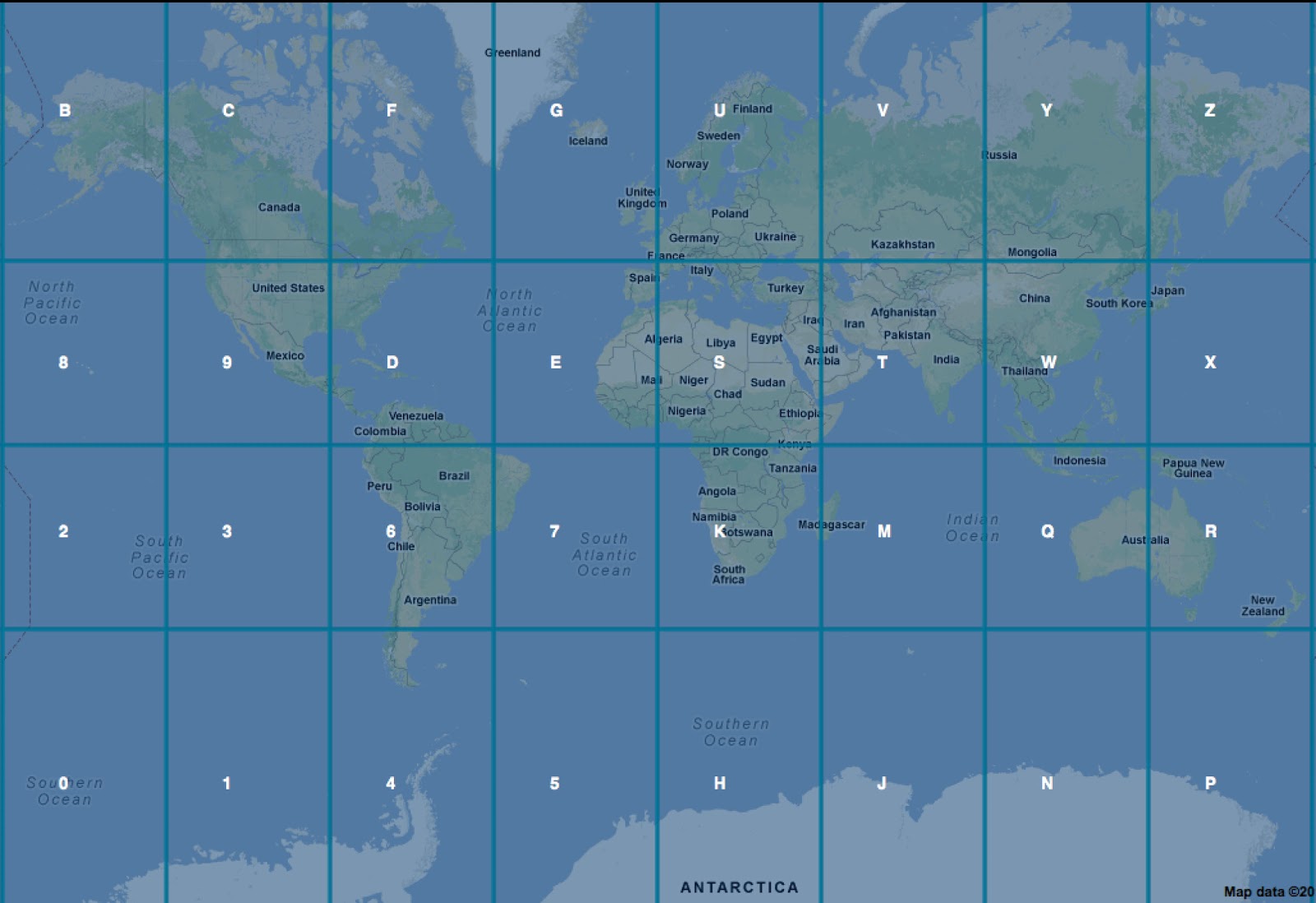
Normally you locate a point with longitude and latitude. Geohash is a base-32 encoding that represents the same information as a compact alphanumeric string instead of two decimal numbers. The world is subdivided into labeled cells (using 0–9 and a–z). For example, Independence Palace is w3gv7cvnryzz at (10.776945451753402, 106.69494867324829).
Precision matters: rounding to 10.77 and 106.69 shifts the point by about 1.3 km—for example alley 150 Nguyen Trai instead of 8 Huyen Tran Cong Chua. You can verify distances in Google Maps.
Nearby areas within roughly 20 km² around Independence Palace share the prefix w3gv, which makes geohash attractive for “near this point” queries backed by an inverted index. Like raw coordinates, longer geohashes mean finer precision.
{:.table.table-bordered}
| GeoHash length | Area height x width |
|---|---|
| 1 | 5,009.4km x 4,992.6km |
| 2 | 1,252.3km x 624.1km |
| 3 | 156.5km x 156km |
| 4 | 39.1km x 19.5km |
| 5 | 4.9km x 4.9km |
| 6 | 1.2km x 609.4m |
| 7 | 152.9m x 152.4m |
| 8 | 38.2m x 19m |
| 9 | 4.8m x 4.8m |
| 10 | 1.2m x 59.5cm |
| 11 | 14.9cm x 14.9cm |
| 12 | 3.7cm x 1.9cm |
IV. Conclusion
Elasticsearch is a practical, powerful search stack—not only for classic full-text search but also for spatial problems. It is quick to prototype yet solid enough for long-running location-based services. Foursquare was an early mover, migrating from Solr to Elasticsearch in August 2012. Other teams such as GitHub and SoundCloud also rely on Elasticsearch for search.
References
Elasticsearch
-
Geo distance filter — Distance filters on
geo_pointfields (legacy guide URL; see current Elasticsearch documentation for newer releases). -
Geohash grid aggregation — Bucketing documents by geohash cells.
Tools
-
geohash.gofreerange.com — Interactive geohash explorer.
-
geohash-js — JavaScript geohash encoder/decoder.
Articles
-
Gauth (2012). Find closest subway station with Elasticsearch.
-
Florian Hopf (2014). Use cases for Elasticsearch: Geospatial search.
-
DigitalOcean Community. How To Install Elasticsearch on an Ubuntu VPS.
-
Foursquare Engineering (2012). Foursquare now uses Elasticsearch.