WebAssembly - Part 1: Introduction

Introducing WebAssembly
At its core, WebAssembly is a new language that can run in the browser (alongside JavaScript, of course). It is designed to be compiled from other low-level languages such as C/C++ and Rust, but it is not meant to replace JavaScript. While JavaScript is powerful enough for most web problems, we also run into performance limits in compute-heavy applications such as 3D games, virtual reality and augmented reality, computer vision, image and video editing, and so on.
WebAssembly matters for the web platform as a whole: it lets programs written in many languages run on the web, which was previously impractical. WebAssembly modules can be embedded not only in browser-based web apps but also in Node.js applications. Today, the WASM format is widely supported in major browsers such as Chrome, Firefox, Safari, and Edge.

Today, WebAssembly use cases extend well beyond online games. Together with the Emscripten compiler, more and more experiments are shipping. Examples include:
- Computer vision
- 3D mapping – Altus platform, Google Earth
- User interface design
- Language detection
- Audio mixing
- Video codec support
- Digital signal processing
- Medical imaging
- Physics simulation
- Cryptography
- Compression – zlib-asm, Brotli, lzma
- Computer algebra
What role does WebAssembly play on the web?
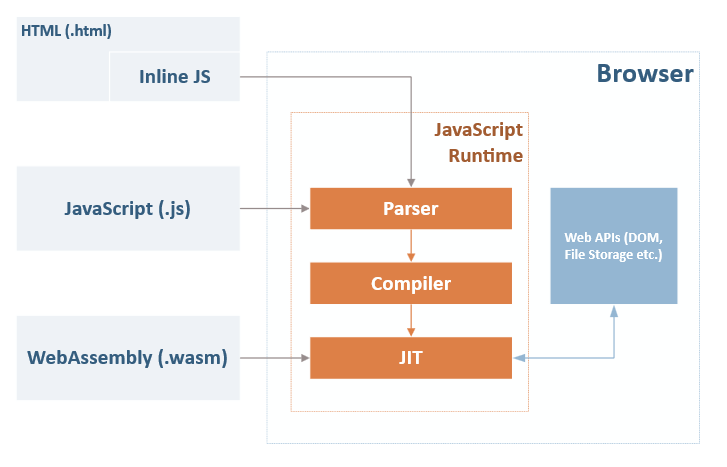
The web platform can be split into two parts:
- A virtual machine that executes JavaScript code
- Web APIs that control browser and device capabilities (DOM, CSSOM, WebGL, IndexedDB, Web Audio API, and so on)
For a long time, the browser’s VM could only load and run JavaScript, and as noted above, that language has drawbacks. WebAssembly was not created to replace JavaScript, but to complement it and run alongside it. Each brings distinct strengths to the web platform. For example:
-
JavaScript is a high-level, flexible, and productive language for web apps. It benefits from dynamic typing, no compile step, and a huge ecosystem of frameworks, libraries, and tooling.
-
WebAssembly, by contrast, is a low-level language with a compact binary format, executed at speeds close to native low-level languages. It also lets code written in memory-manageable low-level languages such as C++ or Rust run on the web. In the future, WebAssembly also aims to support garbage-collected languages such as Python or Ruby.
On execution speed and performance, the WebAssembly FAQ states that WebAssembly can be parsed more than 20× faster than JavaScript.
The kind of binary format being considered for WebAssembly can be natively decoded much faster than JavaScript can be parsed (experiments show more than 20× faster). On mobile, large compiled codes can easily take 20–40 seconds just to parse, so native decoding (especially when combined with other techniques like streaming for better-than-gzip compression) is critical to providing a good cold-load user experience.
Source: WebAssembly FAQ
In short, WebAssembly is a separate language from JavaScript, but the WebAssembly JavaScript API wraps WebAssembly code as JavaScript-callable functions so it can run like ordinary JavaScript in the browser or Node.js.
Enough talk—show me the code
WebAssembly is not really meant to be written by hand (it is compiled from C++/Rust to WASM), but you can still do it manually.
The WebAssembly language specification describes two formats: the compressed binary WASM format, which is what you typically ship, and WAT (WebAssembly Text Format), which is very close to the binary form but more human-readable.
(module
  (func (result i32)
    (i32.const 42)
  )
  (export "helloWorld" (func 0))
)
This is a simple function that returns the constant 42 (the answer to life, the universe, and everything :-P). To compile the WAT above to WASM, install WABT (The WebAssembly Binary Toolkit).
After installing WABT, run the following from a console to produce a .wasm file:
wat2wasm hello.wat -o hello.wasmOnce compiled to .wasm, you can call helloWorld from Node.js like this:
const { readFileSync } = require("fs");

const run = async () => {
  const buffer = readFileSync("./hello.wasm");
  const module =  await WebAssembly.compile(buffer);
  const instance = await WebAssembly.instantiate(module);
  console.log(instance.exports.helloWorld());
};

run();
To run in the browser, embed the following script in your HTML:
fetch("hello.wasm").then(response =>
    response.arrayBuffer()
).then(bytes =>
    WebAssembly.instantiate(bytes, {})
).then(result =>
    result.instance
).then(instance =>
    console.log(instance.exports.helloWorld())
);<!DOCTYPE html>
<html lang="en">
<head>
<meta charset="UTF-8">
<title>Hello WebAssembly</title>
</head>
<body>
<!-- The only thing that matters is the following line,
although having a valid HTML5 page is nice. -->
<script src="hello.js"></script>
</body>
</html>You can also experiment with WebAssembly in the WebAssembly Explorer.
References
Further reading on the ideas in this post: the binary module model, loading from JS, browser adoption, and design tradeoffs versus JavaScript.
-
WebAssembly Concepts — MDN introduction to modules, memory, tables, and how WASM fits next to JavaScript on the web platform.
-
Loading and running WebAssembly code — Step-by-step: fetch (or read) a
.wasmfile, compile, instantiate, and call exported functions—matches the Node.js andfetchexamples above. -
WebAssembly JavaScript API — Reference for the global
WebAssemblyobject (compile,instantiate, etc.) used to embed WASM in the browser or Node.js. -
WebAssembly support now shipping in all major browsers — Mozilla’s announcement of cross-browser WASM support (Chrome, Firefox, Safari, Edge), in line with the “browser party” theme of this post.
-
7 Things You Should Know About WebAssembly — Short, opinionated overview: security model, relationship to asm.js, and why WASM matters for the web.
-
WebAssembly FAQ — Official answers on goals, parsing speed versus JavaScript, and portability; source for the FAQ quote about binary decoding and cold-load performance.