Understanding asyncio in Python
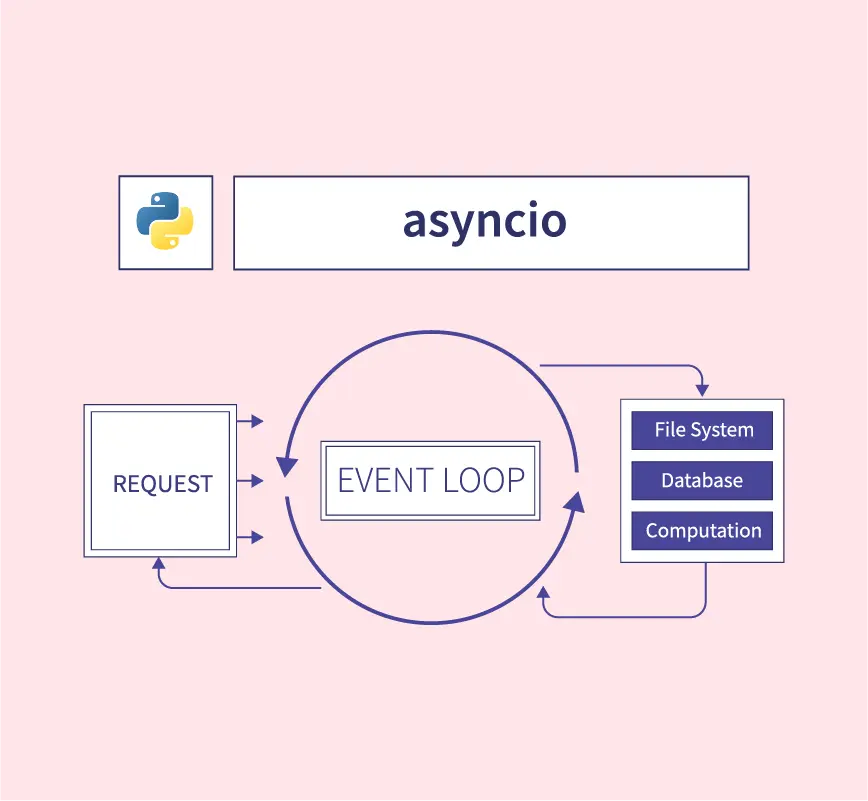
Introduction
If you have worked with JavaScript or TypeScript, you are probably familiar with async/await. Python offers a similar mechanism through the asyncio library, which joined the standard library in Python 3.4 (2014) and has matured in later releases. Unlike JavaScript, which has been single-threaded and event-driven from the start, Python has a more complicated history with concurrency, and asyncio exists to solve a very specific problem: I/O-bound concurrency.
This post goes from fundamentals to practical use, especially how asyncio is leveraged in FastAPI—one of the most popular Python web frameworks today.
Why asyncio?
Before asyncio, handling many concurrent I/O tasks in Python usually meant threading or multiprocessing. Both have drawbacks:
- Threading: limited by the GIL (Global Interpreter Lock); threads do not truly run in parallel for CPU-bound work. Managing threads is tricky and race conditions are common.
- Multiprocessing: heavier because each process has its own memory. Creating processes and communicating between them also adds overhead.
For I/O-bound work (calling APIs, reading and writing databases, file I/O…), most of the time the program is simply waiting for a response. While it waits, the CPU sits idle. asyncio lets the program use that waiting time to do other work, all on a single thread.
Under the hood, asyncio uses an event loop to manage coroutines. When a coroutine hits an await (waiting on I/O), the event loop pauses that coroutine and runs another one that is ready. This is cooperative multitasking—coroutines voluntarily yield execution to each other.
Core concepts
Coroutine
In Python, a coroutine is declared with async def. Unlike an ordinary function, calling a coroutine does not run it immediately; it returns a coroutine object. You must await it or schedule it on the event loop.
import asyncio

async def say_hello(name: str) -> str:
    await asyncio.sleep(1)  # simulate I/O
    return f"Hello, {name}!"

# Calling say_hello("World") directly does NOT run the function;
# it only returns a coroutine object
coro = say_hello("World")
print(type(coro))  # <class 'coroutine'>

# To actually run it, use asyncio.run()
result = asyncio.run(say_hello("World"))
print(result)  # Hello, World!
Event Loop
The event loop is the heart of asyncio. It schedules and runs coroutines, handles I/O events, and runs callbacks. From Python 3.10 onward, you rarely touch the event loop directly—asyncio.run() handles it.
import asyncio

async def main():
    print("Start")
    await asyncio.sleep(1)
    print("After 1 second")

# asyncio.run() creates the event loop, runs the coroutine, then closes the loop
asyncio.run(main())
Tasks and concurrency
This is where it gets interesting. If you only await coroutines one after another, you might as well write synchronous code. The real power is running many coroutines at once.
import asyncio
import time

async def fetch_data(source: str, delay: float) -> str:
    print(f"Starting fetch from {source}...")
    await asyncio.sleep(delay)  # simulate a network call
    print(f"Done {source}!")
    return f"Data from {source}"

async def main():
    start = time.perf_counter()

    # ❌ Sequential — total time = 1 + 2 + 3 = 6 seconds
    # r1 = await fetch_data("API A", 1)
    # r2 = await fetch_data("API B", 2)
    # r3 = await fetch_data("API C", 3)

    # ✅ Concurrent — total time ≈ 3 seconds (max of the three tasks)
    results = await asyncio.gather(
        fetch_data("API A", 1),
        fetch_data("API B", 2),
        fetch_data("API C", 3),
    )

    elapsed = time.perf_counter() - start
    print(f"Results: {results}")
    print(f"Finished in {elapsed:.1f}s")

asyncio.run(main())
Typical output:
Starting fetch from API A...
Starting fetch from API B...
Starting fetch from API C...
Done API A!
Done API B!
Done API C!
Results: ['Data from API A', 'Data from API B', 'Data from API C']
Finished in 3.0s
Instead of waiting six seconds sequentially, asyncio.gather() runs all three coroutines concurrently, so total time is roughly that of the slowest task.
asyncio.gather vs asyncio.create_task vs TaskGroup
Python offers several ways to run coroutines concurrently; each has trade-offs:
asyncio.gather()
The simplest approach: bundle several coroutines and wait until they all finish. Results come back in input order.
results = await asyncio.gather(
    fetch_data("A", 1),
    fetch_data("B", 2),
    return_exceptions=True  # do not raise; return exceptions in the list
)
asyncio.create_task()
Creates a Task and schedules it on the event loop. You can await it later or cancel it.
async def main():
    task1 = asyncio.create_task(fetch_data("A", 1))
    task2 = asyncio.create_task(fetch_data("B", 2))

    # Do other work while task1 and task2 run...
    print("Doing something else...")

    result1 = await task1
    result2 = await task2
asyncio.TaskGroup (Python 3.11+)
The newer, recommended style. TaskGroup is a context manager that ensures tasks are cleaned up correctly when an exception occurs.
async def main():
    async with asyncio.TaskGroup() as tg:
        task1 = tg.create_task(fetch_data("A", 1))
        task2 = tg.create_task(fetch_data("B", 2))
        task3 = tg.create_task(fetch_data("C", 3))

    # All tasks have finished when exiting the context manager
    print(task1.result(), task2.result(), task3.result())
If any task in the TaskGroup raises, the remaining tasks are cancelled. That is safer than gather()—it avoids “zombie” tasks still running after a failure.
Useful patterns
Semaphore — limiting concurrency
Firing 10,000 requests at once sounds impressive, but the remote server (or your own system) will not thank you. asyncio.Semaphore caps how many coroutines run at once.
import asyncio
import aiohttp

async def fetch_url(session: aiohttp.ClientSession, url: str, sem: asyncio.Semaphore) -> str:
    async with sem:
        async with session.get(url) as response:
            return await response.text()

async def main():
    sem = asyncio.Semaphore(10)  # at most 10 concurrent requests
    urls = [f"https://httpbin.org/delay/1?n={i}" for i in range(100)]

    async with aiohttp.ClientSession() as session:
        tasks = [fetch_url(session, url, sem) for url in urls]
        results = await asyncio.gather(*tasks)
Timeout
Never wait on an I/O operation without a timeout. asyncio.wait_for() or asyncio.timeout() (Python 3.11+) does that for you.
async def risky_operation():
    await asyncio.sleep(10)
    return "done"

async def main():
    # Python 3.11+
    async with asyncio.timeout(5):
        result = await risky_operation()  # raises TimeoutError after 5 seconds

    # Older style (still works)
    try:
        result = await asyncio.wait_for(risky_operation(), timeout=5.0)
    except asyncio.TimeoutError:
        print("Timed out!")
Queue — producer/consumer pattern
asyncio.Queue fits producer/consumer pipelines when you need to stream work.
import asyncio
import random

async def producer(queue: asyncio.Queue, name: str):
    for i in range(5):
        item = f"{name}-item-{i}"
        await queue.put(item)
        await asyncio.sleep(random.uniform(0.1, 0.5))
    await queue.put(None)  # signal done

async def consumer(queue: asyncio.Queue):
    while True:
        item = await queue.get()
        if item is None:
            break
        print(f"Processing: {item}")
        await asyncio.sleep(0.2)
        queue.task_done()

async def main():
    queue: asyncio.Queue[str | None] = asyncio.Queue(maxsize=10)

    producers = [
        asyncio.create_task(producer(queue, f"P{i}"))
        for i in range(3)
    ]
    consumer_task = asyncio.create_task(consumer(queue))

    await asyncio.gather(*producers)
    await queue.join()
asyncio in FastAPI
FastAPI is built from the ground up to use asyncio. It runs on uvicorn, an ASGI server, so the server already has an event loop. That is why FastAPI can handle many concurrent requests without spawning lots of threads or processes like traditional WSGI frameworks (Flask, Django).
Basics: async endpoints
from fastapi import FastAPI
import httpx

app = FastAPI()

@app.get("/")
async def root():
    return {"message": "Hello World"}

@app.get("/external-data")
async def get_external_data():
    async with httpx.AsyncClient() as client:
        response = await client.get("https://jsonplaceholder.typicode.com/todos/1")
        return response.json()
When you declare an endpoint with async def, FastAPI runs it on the event loop. While one request waits on an external API, the loop can handle other requests. No thread is blocked.
When to use async def vs def?
A common question for newcomers:
async def: Use when the endpoint performs async I/O (HTTP calls, async database drivers, async file I/O…).def(non-async): Use for CPU-bound work or synchronous libraries. FastAPI runs these in a thread pool so they do not block the event loop.
from fastapi import FastAPI
import httpx
import time

app = FastAPI()

# ✅ Async endpoint — use when you have async I/O
@app.get("/async-data")
async def get_async_data():
    async with httpx.AsyncClient() as client:
        resp = await client.get("https://api.example.com/data")
        return resp.json()

# ✅ Sync endpoint — FastAPI runs this in a thread pool
@app.get("/cpu-heavy")
def compute_something():
    # Simulate CPU-bound work
    result = sum(i * i for i in range(1_000_000))
    return {"result": result}

# ❌ Wrong — async def with sync I/O blocks the event loop
@app.get("/bad-example")
async def bad_endpoint():
    time.sleep(5)  # BLOCKS the whole event loop!
    return {"oops": "do not do this"}
The third example is a widespread mistake. If you use async def but call time.sleep() (or any blocking I/O), you block the entire event loop, so every other request waits. If you must run blocking code inside async code, use asyncio.to_thread():
import asyncio

@app.get("/safe-blocking")
async def safe_blocking():
    result = await asyncio.to_thread(some_blocking_function)
    return {"result": result}
Calling multiple services in parallel
A common microservice pattern is an endpoint that aggregates data from several services. With asyncio, you can call them in parallel instead of sequentially.
from fastapi import FastAPI
import httpx
import asyncio

app = FastAPI()

async def fetch_user(client: httpx.AsyncClient, user_id: int) -> dict:
    resp = await client.get(f"https://api.example.com/users/{user_id}")
    return resp.json()

async def fetch_orders(client: httpx.AsyncClient, user_id: int) -> list:
    resp = await client.get(f"https://api.example.com/orders?user_id={user_id}")
    return resp.json()

async def fetch_notifications(client: httpx.AsyncClient, user_id: int) -> list:
    resp = await client.get(f"https://api.example.com/notifications/{user_id}")
    return resp.json()

@app.get("/dashboard/{user_id}")
async def get_dashboard(user_id: int):
    async with httpx.AsyncClient() as client:
        user, orders, notifications = await asyncio.gather(
            fetch_user(client, user_id),
            fetch_orders(client, user_id),
            fetch_notifications(client, user_id),
        )

    return {
        "user": user,
        "orders": orders,
        "notifications": notifications,
    }
If each service takes about 200 ms, sequential calls take ~600 ms, while asyncio.gather() takes ~200 ms. At hundreds of requests per second, that difference matters.
Dependency injection with async
FastAPI supports async dependencies naturally:
from fastapi import FastAPI, Depends
import httpx

app = FastAPI()

async def get_http_client():
    async with httpx.AsyncClient() as client:
        yield client

@app.get("/data")
async def get_data(client: httpx.AsyncClient = Depends(get_http_client)):
    resp = await client.get("https://api.example.com/data")
    return resp.json()
Background tasks
FastAPI includes BackgroundTasks for work that does not need to finish before the response (email, logging, file processing…).
import asyncio
from fastapi import FastAPI, BackgroundTasks

app = FastAPI()

async def send_notification(email: str, message: str):
    # Simulate sending email
    await asyncio.sleep(2)
    print(f"Sent '{message}' to {email}")

@app.post("/register")
async def register_user(email: str, background_tasks: BackgroundTasks):
    # Create user immediately...
    user = {"email": email, "status": "active"}

    # Send email in the background; do not block the response
    background_tasks.add_task(send_notification, email, "Welcome!")

    return user  # Response returns immediately; email is not awaited
Important caveats
1. asyncio is not a silver bullet
asyncio shines for I/O-bound work. For CPU-bound tasks (heavy computation, image processing, ML inference…), asyncio does not help. Use multiprocessing or offload to a worker queue (Celery, RQ…).
2. Watch out for blocking code
The most common mistake is mixing synchronous blocking calls into async code. Libraries such as requests, psycopg2, or time.sleep() block the event loop. Prefer async alternatives like httpx, asyncpg, aiofiles.
| Sync (blocking) | Async alternative |
|---|---|
requests | httpx / aiohttp |
psycopg2 | asyncpg |
open() (file I/O) | aiofiles |
time.sleep() | asyncio.sleep() |
sqlite3 | aiosqlite |
3. Debugging asyncio
Enable debug mode to catch subtle issues:
import asyncio

async def main():
    ...

asyncio.run(main(), debug=True)
Or set the environment variable PYTHONASYNCIODEBUG=1. Debug mode warns when coroutines are awaited for too long or never awaited.
Summary
asyncio is a powerful tool in Python for I/O-bound workloads. It lets you write concurrent code without wrestling with threads or processes. FastAPI leans heavily on asyncio, so you can build high-throughput APIs with simple, clean syntax.
Remember that asyncio is not the answer to every problem. Knowing when to use async def versus ordinary def is key to getting the most out of FastAPI—and Python in general.